

Small studio gear decisions tend to look simple until the cart total starts climbing. The Audient iD4 MKII sits in that awkward sweet spot where beginners, podcasters, guitar players, and bedroom producers all want better sound without buying a rack full of gear. That is why a record-low bundle price gets attention fast, especially when the package includes items you would end up buying anyway. For U.S. shoppers tracking creator gear through retail news cycle, the bigger question is not “Is this cheap?” It is “Does this bundle remove real setup problems?” A USB audio interface can look like a small black box, but it decides how your microphone, guitar, headphones, speakers, and recording software behave together. When the price drops, the iD4 MKII becomes less of a nice upgrade and more of a practical first studio move.
Why This Price Drop Matters for Home Recording Buyers
A discount on recording gear is only useful when the gear solves the right problem. The iD4 MKII is not aimed at someone tracking drums with six microphones or running a full band into a laptop. It is built for the person recording one serious source at a time: a vocal, a guitar, a podcast mic, a bass line, a voice-over, or a synth part through the correct input path.
That matters because many buyers overpay for channels they do not use. A one-person setup in a bedroom, spare room, apartment desk, or small content corner often needs cleaner gain, better monitoring, and fewer headaches. Not four extra inputs. The value of the current bundle depends on whether it gives you the missing pieces around the box, not only the box itself.
The Deal Is Strongest When the Bundle Replaces Guesswork
The hidden cost of a first studio is not always the interface. It is the small stuff that delays the first clean recording. A cable that does not match. Headphones that leak into the mic. A mic stand that sags. A cheap adapter that adds hum. That is where a recording bundle price can earn its keep.
A buyer in Ohio setting up a podcast desk may not care about studio jargon. They need a mic to plug in, headphones that work, and a way to hear themselves without a slapback delay. A singer in Phoenix may need a stable USB-C connection and enough headphone level to cut vocals late at night. A guitarist in Nashville may care more about the front instrument input than the spec sheet.
The non-obvious part is this: a smaller bundle can beat a larger one. If a package includes the right headphones and a usable cable, it can be better than a flashy bundle stuffed with weak accessories. Extra pieces look generous on a product page, but dead-weight gear still takes space on your desk.
Why Entry-Level Does Not Mean Disposable
Many budget interfaces feel like starter gear in the worst sense. You buy them to get going, then plan to replace them after the first rough month. The iD4 MKII has a different pull because it offers a cleaner path for people who want to stay small but sound serious.
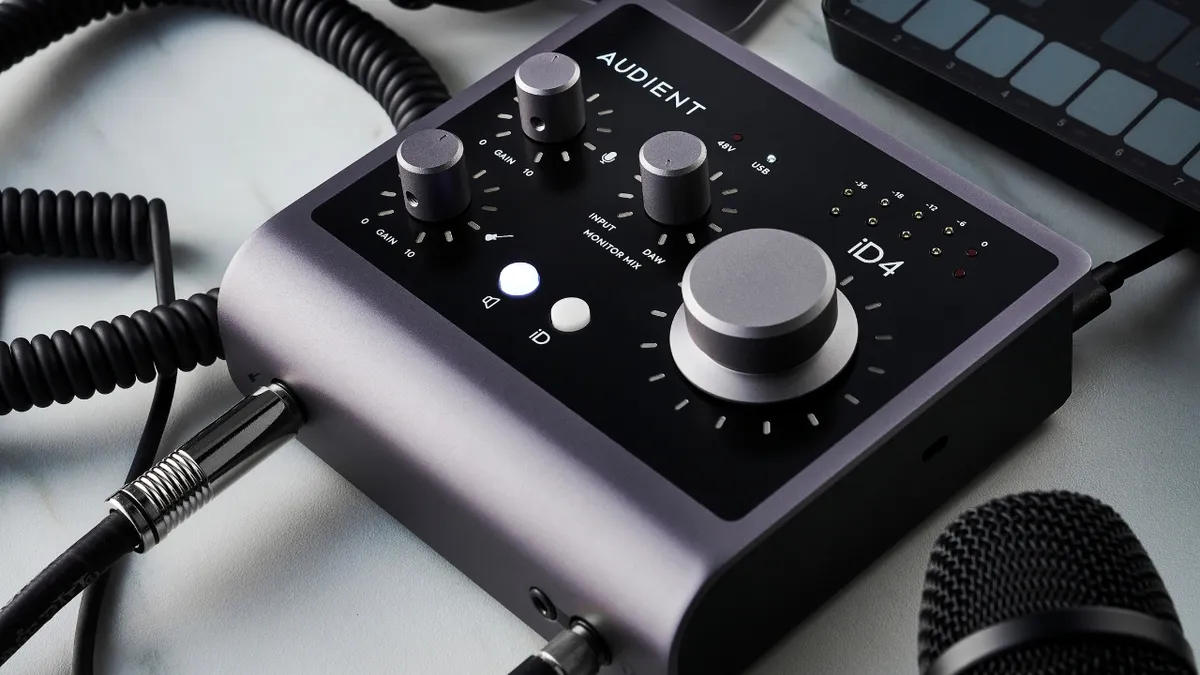
Audient lists the iD4 as a 2-in/2-out interface with one analog mic preamp, one instrument input, dual headphone outputs, bus power, and USB-C operation, while its official specs show support for up to 24-bit/96kHz recording and low mixer latency figures. That is enough for the most common home studio workflow: one mic, one instrument, speakers, headphones, and a laptop.
Here is the practical point. You do not need a giant interface to make clean vocals for YouTube, record acoustic guitar, cut demo vocals, or build songs one part at a time. You need stable gain, honest monitoring, and controls that make sense when you are tired. That last part gets ignored too often.
Audient iD4 MKII Value for Creators, Musicians, and Podcasters
The Audient iD4 MKII becomes more interesting when the price gets close to mass-market beginner interfaces, because its appeal is not based on having the most inputs. Its appeal is that it feels focused. The layout makes sense, the desktop footprint stays small, and the feature set lines up with how many U.S. creators work now: alone, fast, and in imperfect rooms.
That does not make it perfect for everyone. It means the value is specific. A solo singer-songwriter, remote voice actor, livestream host, online teacher, or guitar player may get more from a tight 2-in/2-out unit than from a crowded interface with knobs they never touch. The value shows up when you stop buying for a fantasy studio and start buying for Tuesday night.
A USB Audio Interface Should Make Monitoring Feel Natural
Monitoring is where many cheap setups fall apart. You record a vocal, but the sound in your headphones feels late. You turn up the volume, then the backing track gets too loud. You lower the gain, then the take feels thin. The gear is working, yet the session feels wrong.
A good USB audio interface helps you stay inside the performance instead of fighting the signal path. For a podcast host, that means hearing their voice clearly while a guest speaks. For a guitarist, it means playing through an amp sim without feeling disconnected from the strings. For a vocalist, it means hearing enough detail to control pitch and breath.
The iD4 MKII has two headphone outputs, which sounds minor until two people sit at the same desk. A singer and producer can both monitor. A podcaster and guest can both hear the mix. A parent recording a kid’s voice-over for a school project can check levels without passing one pair of headphones back and forth. Small feature. Big comfort.
The Home Studio Interface Sweet Spot Is Smaller Than People Think
People often shop audio gear like they are building Abbey Road in a spare bedroom. They compare input counts, sample rates, software packs, and flashy bundles until the simple need gets buried. Most home creators record one thing at a time.
That is why a home studio interface with fewer channels can still feel like the smarter buy. A single clean mic input and a proper instrument input can cover vocals, guitar, bass, podcasting, voice-over, short-form video narration, online lessons, and demo production. If your work happens track by track, a lean setup can keep you moving.
The counterintuitive lesson is that limits can help. Two inputs force cleaner sessions. You plan takes. You place the mic better. You listen harder. Instead of treating the interface like a safety net, you treat the recording like a performance. That can make the final track sound more confident.
For readers comparing other starter setups, beginner podcast equipment guide and home music recording setup tips can help connect the interface decision to the rest of the desk.
What to Check Before You Buy the Bundle
A low price can make people rush. That is exactly when the wrong bundle slips into the cart. The iD4 MKII itself may be the center of the deal, but the surrounding items decide whether the package saves money or creates another pile of replacements.
Retail listings currently show the iD4 MKII sold both alone and in bundles, with U.S. retailers such as Sweetwater listing headphone and monitor packages, while B&H and Adorama show standalone pricing around the mid-$200 range at the time of search. Prices move, so the smart move is to judge the bundle by what you can verify at checkout, not by the word “record.”
The Microphone, Headphones, and Cables Decide the Real Savings
A bundle with poor accessories is not a bargain. It is a delayed second purchase. Look at each included item as if you were buying it separately. Does the mic match your use? Are the headphones closed-back for recording? Are the cables the correct type? Does the bundle include anything you would never use?
For podcasting and vocal tracking, closed-back headphones matter because they reduce sound leaking into the microphone. For guitar recording, the instrument cable matters more than a decorative pop filter. For monitor bundles, balanced cables can keep noise lower when your speakers sit near power strips, lamps, chargers, and a laptop dock.
A real example: a buyer in a small Brooklyn apartment may be better served by the interface plus headphones than by the interface plus studio monitors. Speakers sound fun, but thin walls and late-night recording may keep them turned down. In that case, better headphones are not a compromise. They are the correct choice.
Compatibility Is Boring Until It Saves the Session
Before buying, check your computer ports, operating system, recording software, and desk power setup. Audient’s official iD4 technical page lists USB-C high-speed operation and bus-power requirements, including higher current needs for full headphone output over USB-C. That detail is not glamorous, but it matters when you plug into an older laptop hub and wonder why the interface acts strange.
Bus power is a gift when it works. No wall wart. Less clutter. Easier travel. But bus-powered gear still depends on the quality of the port feeding it. A weak hub can create dropouts, lower headphone headroom, or random connection problems that get blamed on the interface.
The fix is simple. Use the correct cable. Avoid cheap unpowered hubs for serious recording. Plug into the computer when possible. Keep your setup boring and repeatable. Creative work already has enough chaos.
Who Should Buy It, and Who Should Skip It
The best deal is not the one with the biggest markdown. It is the one that fits your next year of work. The iD4 MKII is a smart target for some buyers, but it is not the right answer for a full band, a hardware synth setup that needs MIDI, or a creator who needs several microphones at once.
This is where honest buying advice beats hype. A product can be excellent and still wrong for your workflow. The iD4 MKII shines when the setup is small, the source matters, and the user wants a better recording chain without a complicated desktop.
It Fits Solo Creators Who Care About Clean Sound
The strongest buyer is a solo creator who records one main source and wants the result to feel less amateur. That could be a singer laying vocals over beats. A guitarist recording DI tracks. A podcaster upgrading from a USB mic. A voice actor building a quiet corner. A YouTuber recording narration after work.
The iD4 MKII also makes sense for students and part-time creators because it does not demand a full studio plan. It can sit beside a laptop, pair with one solid microphone, and handle many small sessions without turning the desk into a control room. That matters for renters and dorm users across the U.S., where space and noise rules shape gear choices as much as budget does.
A mildly strange truth: many people do not need more gear after this. They need better mic placement, a quieter room, and more takes. Once the interface stops being the weak link, the human part gets exposed. That can feel uncomfortable, but it is where better recordings begin.
Skip It If Your Workflow Is Already Bigger
The iD4 MKII is not the obvious pick for a drummer, a podcast with four in-person hosts, a keyboard-heavy producer who wants MIDI ports, or a band capturing rehearsals live. Those people should look at larger interfaces with more mic preamps, line inputs, or routing options.
It may also be the wrong bundle if you already own better headphones, a good mic, or studio monitors. Do the math. If the package includes items that will sit in a drawer, buy the interface alone and put the saved cash toward acoustic treatment, a better stand, or a microphone that fits your voice.
This is the part deal pages rarely say out loud: buying less can be the pro move. A clean interface, one dependable mic, one good cable, and one honest pair of headphones can beat a crowded desk full of “starter” pieces. The recording does not care how many boxes arrived. It cares what reached the take.
Conclusion
A record-low bundle can be a smart opening for anyone building a small recording setup, but the discount should not be the whole story. The better question is whether the package helps you record sooner, cleaner, and with fewer weak links. For solo creators, the Audient iD4 MKII makes sense because it focuses on the work most people do at home: one voice, one instrument, one clear signal, and enough monitoring control to stay confident.
Do not buy it because the bundle looks large. Buy it because the pieces match your real sessions. Check the headphone type, cable needs, return window, and current standalone price before you decide. If the bundle saves money on items you would already choose, it is a strong move. If not, buy the box alone and build around it with care.
The best home studio is not the biggest one. It is the one that lets you press record without second-guessing the chain.
Frequently Asked Questions
How much should I pay for an Audient iD4 MKII bundle?
A fair bundle price depends on the included gear, not only the interface discount. Compare the standalone interface price, then add the real street price of the headphones, mic, cables, or monitors. If the savings are small and the accessories are weak, skip the package.
Is the iD4 MKII good for podcast recording?
Yes, it works well for one-person podcasting or a host-and-guest desk setup if the bundle includes proper headphones. It gives you a clean mic path, simple control, and enough monitoring comfort for spoken-word work. Larger roundtable podcasts need more mic inputs.
Can I record guitar with this interface?
Yes, the front instrument input is made for direct guitar or bass recording. You can record clean DI tracks, then use amp software inside your recording program. It is a strong fit for players who build parts one layer at a time.
Does this interface work for beginners?
Yes, beginners can grow into it without feeling trapped by a cheap first purchase. The controls are not hard to understand, and the feature set avoids clutter. You still need to learn mic placement, gain setting, and basic recording habits.
Is a bundle better than buying the interface alone?
A bundle is better only when the included items match your setup. Closed-back headphones, correct cables, and a useful mic can save money. Random accessories, weak stands, or monitors you cannot use in your room may turn the deal into clutter.
Do I need studio monitors with the iD4 MKII?
No, not at first. Many home creators should start with good headphones, especially in apartments or shared homes. Studio monitors help with mixing, but they also need space, speaker placement, and a room that does not distort what you hear.
What computer port should I use with the iD4 MKII?
Use a direct USB-C or strong USB connection when possible, and avoid cheap unpowered hubs during recording. Stable power and data flow matter more than people expect. A poor hub can cause problems that look like software or driver issues.
Who should avoid this audio interface?
Avoid it if you need several microphones at once, MIDI connections, or a live band recording setup. It is built for focused solo work, not large sessions. Buyers with bigger routing needs should look at interfaces with more inputs and deeper control.